What Is an OpenAI-Compatible API? Endpoints, SDK Setup, and Provider Switching
Learn what OpenAI-compatible means, which endpoints and SDK settings carry over, what can break, and how to switch providers with curl, Python, and JavaScript.
API fundamentals·Published ·Checked ·By RouterPlex·8 min
One API key for every model on RouterPlex: vendor list price, $0 top-up fee, from $5.
Create a key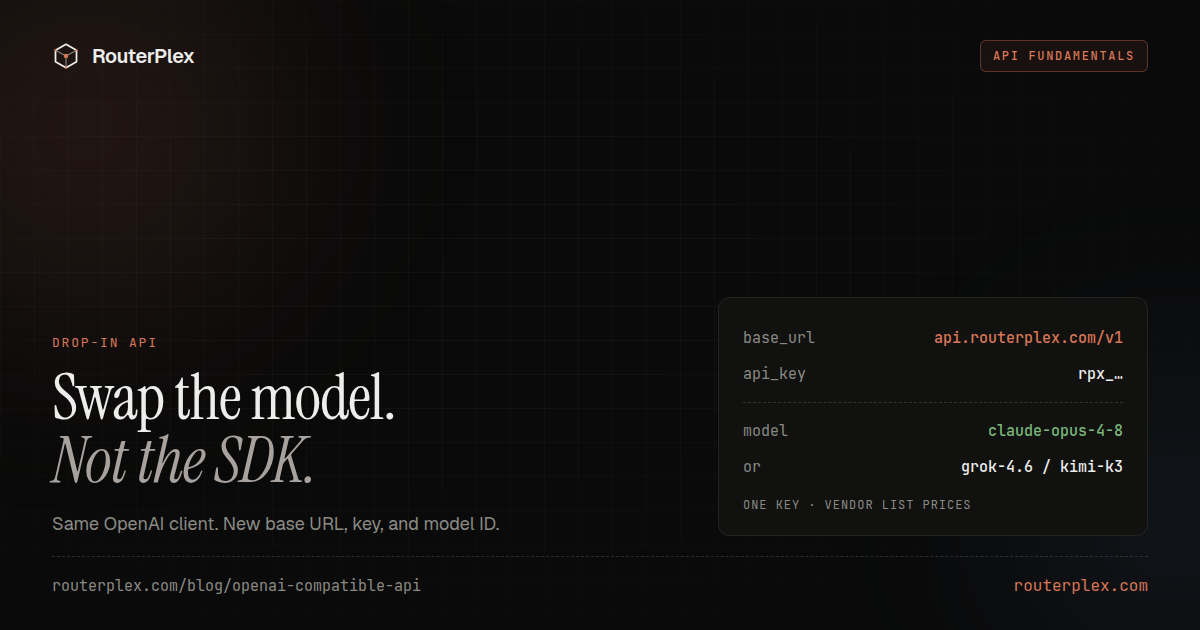
On this page
An OpenAI-compatible API implements enough of OpenAI's HTTP and SDK conventions that an existing client can call it without a complete integration rewrite. For a standard chat application, the portable core is usually the /v1/chat/completions request and response shape: change the base URL, API key, and model ID, then keep using client.chat.completions.create().
The word compatible does not mean identical. A provider may support Chat Completions but not Responses, embeddings, audio, or every parameter. Model behavior, tool calling, streaming events, errors, rate limits, and token accounting can also differ. Treat compatibility as an endpoint-by-endpoint contract that you verify against your own workload.
Sources: the OpenAI API reference, official OpenAI Python SDK, official OpenAI JavaScript SDK, and RouterPlex Chat Completions documentation, checked August 3, 2026.
What OpenAI-compatible means in practice
Most compatible chat APIs preserve four conventions:
- A versioned base URL, commonly ending in
/v1. - Bearer-token authentication through the
Authorizationheader. - A
POST /v1/chat/completionsroute with amodelandmessagesarray. - A response whose generated message is available under
choices[0].message.
That common surface is why the official OpenAI SDKs can work with services operated by other companies. The Python client exposes a base_url option; the JavaScript client uses baseURL. Many IDEs, coding agents, workflow tools, and self-hosted model servers expose the same setting under a label such as OpenAI Compatible, API Base, or Custom Provider.
Compatibility is a convention, not a certification program. Always check which route the client sends and which route the provider implements.
Common endpoints and RouterPlex support
An OpenAI-compatible service does not need to implement the entire OpenAI API. Start with the endpoint your application actually calls.
| Endpoint or capability | Typical purpose | RouterPlex behavior |
|---|---|---|
POST /v1/chat/completions | Message-based text, tools, vision, streaming | Supported across all 71 chat models; advanced features are model-dependent |
GET /v1/models | List available model IDs | Supported |
POST /v1/responses | Newer OpenAI response and agent workflows | Supported for Codex custom providers; other compatible clients should use Chat Completions unless their docs require Responses |
POST /v1/images/generations | Create images from prompts | Supported with gpt-image-2 |
| Streaming with SSE | Receive output incrementally | Supported on Chat Completions |
| Function calling and tools | Let a model request application functions | Supported when the selected model supports it |
| Vision input | Send images with a prompt | Supported when the selected model supports it |
| JSON mode or structured output | Constrain the response shape | Supported when the selected model supports it |
POST /v1/messages | Anthropic Messages request shape | Also supported, but this is Anthropic-compatible rather than OpenAI-compatible |
RouterPlex currently exposes 72 models across 15 providers: 71 chat models plus one image model. Your application sends an exact model ID from the live model catalog. A built-in optimization layer can then route the request to cut cost by up to 40% with no quality loss.
Call an OpenAI-compatible API with curl
A direct HTTP request makes the compatibility boundary easy to see:
curl https://api.routerplex.com/v1/chat/completions \-H "Authorization: Bearer $ROUTERPLEX_API_KEY" \-H "Content-Type: application/json" \-d '{"model": "gpt-5.5","messages": [{"role": "user","content": "Explain what an API gateway does in two sentences."}]}'
The base URL is https://api.routerplex.com/v1. When configuring an SDK, give it that base URL and let the SDK append /chat/completions. Do not put the full endpoint into a setting that expects only the base URL.
To inspect the model IDs available to the key:
curl https://api.routerplex.com/v1/models \-H "Authorization: Bearer $ROUTERPLEX_API_KEY"
Use an exact returned id as the model value. Display names and IDs from another provider are not guaranteed to work.
Python SDK setup
Install the official client:
pip install openaiexport ROUTERPLEX_API_KEY="sk-..."
Then configure base_url:
import osfrom openai import OpenAIclient = OpenAI(api_key=os.environ["ROUTERPLEX_API_KEY"],base_url="https://api.routerplex.com/v1",)response = client.chat.completions.create(model="claude-opus-4-8",messages=[{"role": "user","content": "Give me three checks for a safe database migration.",}],)print(response.choices[0].message.content)
The SDK class and method stay the same. The provider-specific values are the credential, base URL, model ID, and any optional parameters supported by that model.
JavaScript and TypeScript SDK setup
Install the same official package used for OpenAI:
npm install openaiexport ROUTERPLEX_API_KEY="sk-..."
Configure baseURL with a capital URL:
import OpenAI from "openai";const client = new OpenAI({apiKey: process.env.ROUTERPLEX_API_KEY,baseURL: "https://api.routerplex.com/v1",});const response = await client.chat.completions.create({model: "gemini-3.5-flash",messages: [{role: "user",content: "Summarize this release note in one sentence.",},],});console.log(response.choices[0].message.content);
Keep API keys in a server-side environment variable. The JavaScript SDK blocks browser use by default because shipping a long-lived API credential to a browser would expose it to users.
A provider-switching configuration that stays portable
Do not scatter provider URLs and model IDs across the application. Put the three values that normally change behind environment variables:
import osfrom openai import OpenAIclient = OpenAI(api_key=os.environ["AI_API_KEY"],base_url=os.environ["AI_BASE_URL"],)response = client.chat.completions.create(model=os.environ["AI_MODEL"],messages=[{"role": "user", "content": "Return only the word ready."}],)
For a RouterPlex test, set:
export AI_API_KEY="$ROUTERPLEX_API_KEY"export AI_BASE_URL="https://api.routerplex.com/v1"export AI_MODEL="gpt-5.5"
This makes a basic provider comparison a configuration change, but it does not remove the need for testing. Model IDs are provider-specific, and optional features may require code changes.
What compatibility does not guarantee
| Area | Why it can differ |
|---|---|
| Endpoint coverage | Chat Completions support does not imply Responses, embeddings, images, audio, batches, or fine-tuning |
| Request parameters | A provider may ignore or reject fields such as reasoning controls, log probabilities, seeds, or structured-output options |
| Model semantics | The same prompt can produce different content, tool choices, refusals, and output lengths on another model |
| Tool calling | Tool schema limits, parallel calls, tool-choice behavior, and returned arguments can vary |
| Streaming | Providers may emit different event details even when the text delta is compatible |
| Errors and retries | Status codes, error bodies, rate-limit headers, timeouts, and retry guidance are not perfectly portable |
| Token accounting | Tokenizers, cached-token fields, reasoning-token fields, and billing totals differ |
| Context and output limits | The effective limit belongs to the selected route, not to the SDK |
| Data handling | Compatibility says nothing about retention, training, regional processing, or privacy terms |
| Pricing and availability | A shared wire format does not imply the same price, latency, uptime, or capacity |
The safest assumption is: the common request can be portable while the operational contract is not.
Migration checklist
- Inventory every API method the application calls, including background jobs and fallback paths.
- Move the base URL, API key, and model ID into configuration.
- Map each old model ID to an exact model ID supported by the new provider.
- Replay a small golden set for plain chat, streaming, tools, structured output, and vision where applicable.
- Validate the response shape before reading optional fields.
- Test authentication failures, unknown models, rate limits, timeouts, and insufficient credit.
- Compare token counts, latency, output quality, and billed cost on the same inputs.
- Add a canary or feature flag so traffic can return to the previous route quickly.
- Give the test integration its own key and hard budget before running agentic or high-concurrency work.
Within RouterPlex, switching among GPT, Claude, Gemini, DeepSeek, Kimi, Qwen, and other supported models usually changes only the model string because they share the Chat Completions route (Claude, GPT, Gemini and Grok are temporarily paused until further notice). You still need to test model-dependent tools, vision, structured output, context limits, and output behavior.
Verification and troubleshooting
A 404 response
Check whether the client expects a base URL or a full endpoint. For the OpenAI Python and JavaScript SDKs, use https://api.routerplex.com/v1; the SDK appends the method path. A client that specifically requires the Responses API must use a provider route that implements /v1/responses.
A 401 authentication error
Confirm the key belongs to the provider at the configured base URL. Make sure the environment variable is available to the actual process, container, or serverless function making the request.
A model-not-found error
List models from /v1/models or copy the ID from the RouterPlex catalog. Do not assume an alias from OpenAI or another gateway exists.
An unsupported-parameter error
Reduce the request to model and messages, confirm the basic route, then add optional fields back one at a time. Check the selected model's capabilities before enabling tools, vision, or structured output.
Streaming works differently
Inspect the raw server-sent events and make the consumer tolerant of optional fields. Test the terminal event, partial tool calls, empty deltas, and interrupted streams rather than checking only visible text.
The request succeeds but quality changes
API compatibility does not make models interchangeable. Evaluate correctness, format adherence, tool selection, latency, and total cost on representative tasks before moving production traffic.
Realtime voice is a different contract. Gemini 3.8 Live is a Live API speech-to-speech model, not a chat-completions ID. Do not paste it into an OpenAI SDK chat client.
Run a bounded compatibility test
RouterPlex gives one API key and one prepaid balance for 72 models across 15 providers. Create a dedicated key, set a hard lifetime budget, and run the same small evaluation through two or three model IDs. That verifies the SDK route, the model behavior, and the billed cost without exposing the full account balance.
Start with a $5 RouterPlex account, follow the quickstart, or compare the wider LLM gateway landscape.
Common questions
Frequently asked questions
What is an OpenAI-compatible API?
It is an API that implements one or more OpenAI request and response conventions closely enough for compatible clients to use them. In a typical Chat Completions integration, you change the base URL, API key, and model ID while keeping the same SDK method and message shape.
Can I use the OpenAI SDK with another provider?
Yes, when that provider documents support for the endpoint and SDK method you use. Configure the provider's base URL and API key, choose one of its model IDs, and test the features your application depends on.
Does OpenAI-compatible mean every OpenAI feature is supported?
No. Compatibility is usually endpoint-specific and there is no universal certification. Responses, embeddings, images, audio, tools, structured output, reasoning parameters, streaming events, and error details can differ by provider.
Is the Gemini Live API OpenAI-compatible?
No. Gemini 3.8 Live and Live Extended Thinking use Google's realtime Live API, not POST /v1/chat/completions. Pointing an OpenAI chat client at gemini-3.8-live will not start a voice session. Use a chat model such as deepseek-v4.1-flash on RouterPlex. Gemini 3.8 Flash stays in the catalog, but Claude, GPT, Gemini and Grok are temporarily paused until further notice.
What normally changes when switching compatible providers?
At minimum, expect to change the base URL, credential, and model ID. You may also need to remove unsupported parameters, update retry and error handling, and account for different rate limits, token usage fields, and model behavior.
Is RouterPlex OpenAI-compatible?
Yes. RouterPlex supports OpenAI-compatible Chat Completions for 71 chat models, model listing, streaming, model-dependent tools, vision and structured output, image generation with gpt-image-2, and a Responses route for Codex custom providers.
Run the smallest paid test.
Add $5, cap the key, and verify the result with your own workload. No subscription, and credit never expires — a first top-up of $25+ is matched with $25 extra.